実験室the resolve api laboratory
Everything Resolve's API can do — and everything it supposedly can't.
Davinci-ProUser is a live laboratory: 94 directives, 28 experiments, and a standing rule that "impossible" is a hypothesis, not a verdict. Every claim gets tested against a running Resolve. Every result — pass or fail — stays on the record.
「出来ない」は
仮説にすぎない。
Breakage is acceptable.
Untested claims are not.
現場報告field report · 16 june 2026
A 6K music video,
assembled by script.
Tonight the bridge pointed at a real edit — not a junk fixture. One prompt, and a 26 GB 6K RED clip walked itself onto a fresh timeline; the song found its way onto an audio track; and we went hunting for frame-accurate sync with no audio-sync API to lean on. Most of it was magic. One part broke — so we found out exactly why, and fixed it. That arc, start to finish, is the whole point.
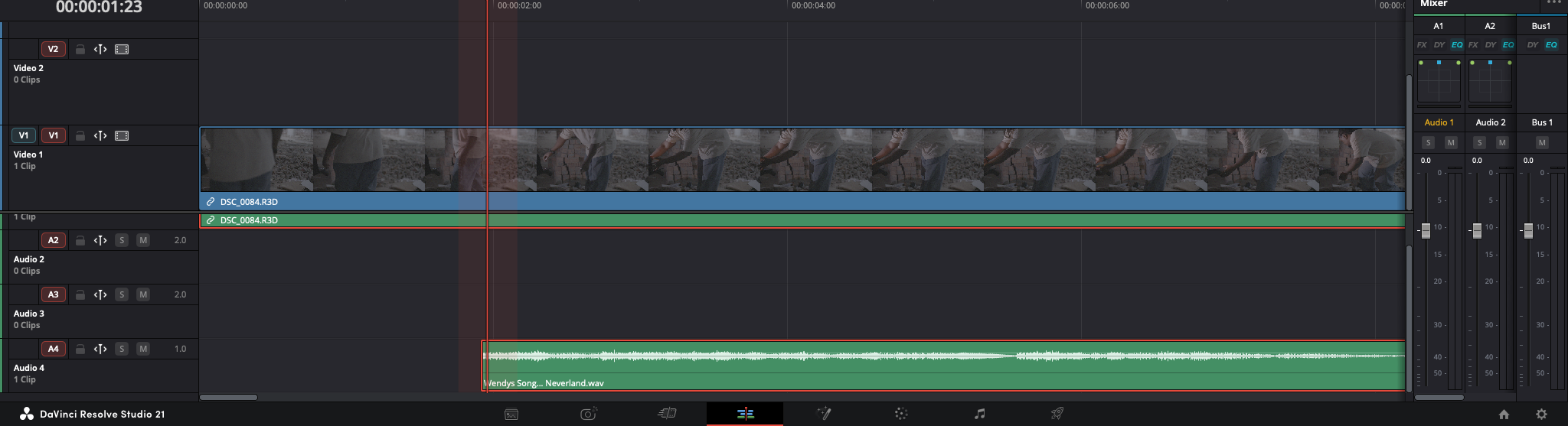
The bridge attached to an open Wendy's Song project, imported the 26 GB 6K R3D NE, and built a timeline from it. AppendToTimeline conform — proven live on RED RAW, not just on paper.
The R3D carried multichannel on-set scratch. We rendered it out via the stock Audio Only preset in 2.6 seconds — bending the render API into the anchor for an audio experiment.
First pass placed the song ~12 s off. Diagnosis: music is periodic, so cross-correlation locks the beat but not the bar — and our search window had capped the offset too short, excluding the true one. The editor's manual sync exposed the real number; a corrected full-range search then landed within 1 frame of that human placement. Three methods (raw x-corr, envelope, GCC-PHAT) now agree. Breakage → diagnosis → fix, on the record.
Hypothesis, every run, and the raw evidence live in experiments/EXP-024-wendy-audio-align/. Breakage is acceptable; untested claims are not.
構造what it is
One organism, three surfaces.
A Mac app and its identical web twin. The Impossibles Ledger is fully interactive — filter the 94 directives, open any hypothesis card, and fire its experiment with one click.
launch the web twin →A single-file localhost server (stdlib Python, nothing to install) that attaches to your running Resolve. With it, every ▶ button in the Lab fires real API calls.
connect your Resolve →Resolve's Workflow Integration plugins are Electron apps — so the Lab docks natively inside Resolve, same palette, fully offline.
see the mission →入口explore
Start anywhere.
All 94 directives — the four colors of "can't," the true impossibles under siege, and the full experiment queue. The deck that explains what we're testing.
view the deck →Why this lab exists, how science-not-vibes works here, what's already real, and three ways to jump onboard.
view the deck →The same 94 directives as living UI — search, filter by status, open hypothesis cards, run experiments through the bridge.
open the ledger →配布download
Run the Lab on your machine.
Builds are published on the releases branch as they ship — grab a dmg, drag to Applications, open.
Davinci-ProUser.app — macOS (Apple Silicon)
The repository is currently private while the lab is in its founding phase — if the links above ask you to sign in, email for tester access and you'll be added directly.
接続connect your resolve
Three commands to a green dot.
In DaVinci Resolve: Preferences → System → General → External scripting using = Local. Studio unlocks the full external API.
From the repo (or the app's bundled copy): python3 bridge/bridge.py. It binds 127.0.0.1 only — nothing leaves your machine. Add --unlock for the live API console.
Use the web twin or the app — the status dot goes green, probes go live, and experiment ▶ buttons run against your Resolve. Your results on your OS/version are data the lab wants.